리버스 프록시(Reverse Proxy)
클라이언트와 WAS(Web Application Server, 웹 애플리케이션 서버)사이에 위치하여 클라이언트의 요청을 받아 내부 WAS로 전달하고 WAS의 응답을 다시 클라이언트에게 보내주는 중개자 역할을 합니다.
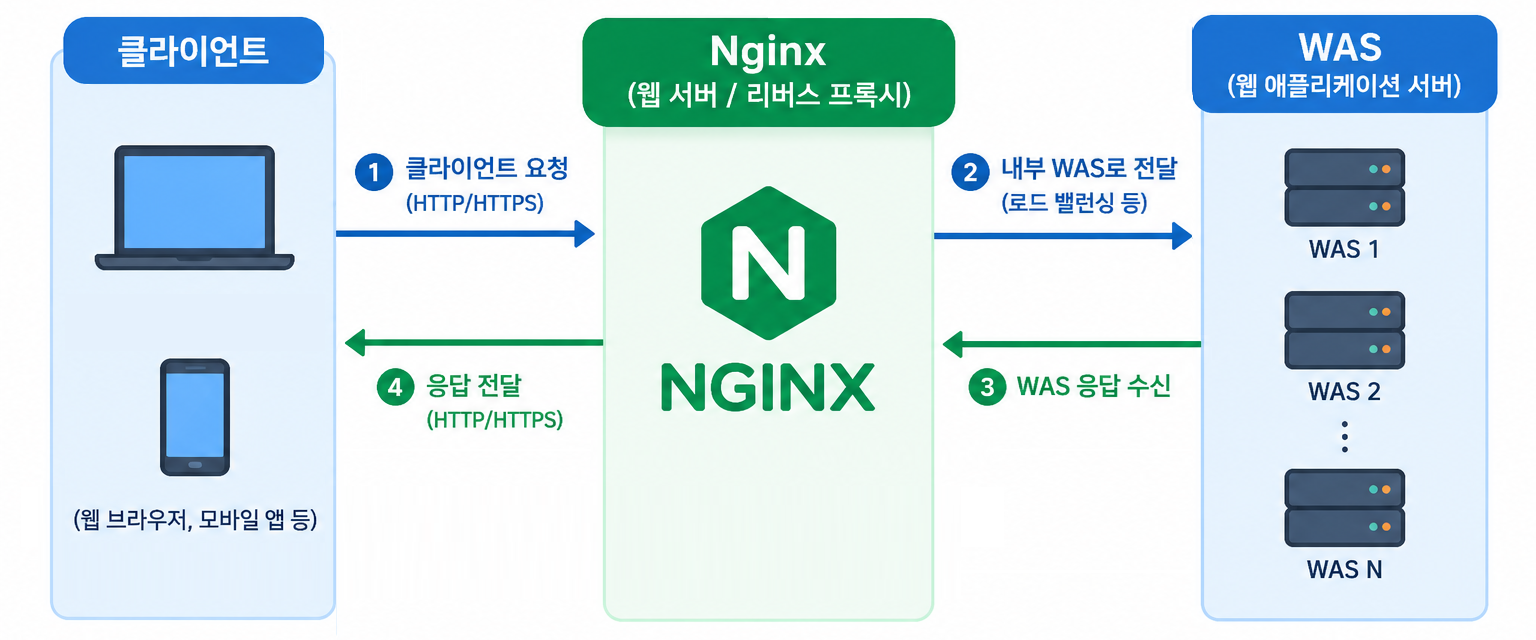
OpenAI로 생성한 이미지입니다.
클라이언트와 WAS사이에서 요청과 응답을 중개하는 것을 프록시(Proxy)라고 하고 이 역할을 하는 시스템을 프록시 서버라고 합니다. Nginx는 웹 서버이면서 리버스 프록시 서버입니다.
리버스 프록시를 사용하면 클라이언트의 요청이 Nginx를 거쳐 내부 WAS로 전달되기 때문에 내부 WAS의 IP, PORT의 정보가 외부로 노출되지 않아 보안이 강화됩니다.
Nginx(엔진 x)와 Spring Boot 애플리케이션 연동
Nginx에서 사용하는 /etc/nginx/conf.d/default.conf 파일입니다.
server {
    listen       80;
    listen  [::]:80;
    server_name  localhost;

    #access_log  /var/log/nginx/host.access.log  main;

    location / {
        root   /usr/share/nginx/html;
        index  index.html index.htm;
    }

    #error_page  404              /404.html;

    # redirect server error pages to the static page /50x.html
    #
    error_page   500 502 503 504  /50x.html;
    location = /50x.html {
        root   /usr/share/nginx/html;
    }

    # proxy the PHP scripts to Apache listening on 127.0.0.1:80
    #
    #location ~ \.php$ {
    #    proxy_pass   http://127.0.0.1;
    #}

    # pass the PHP scripts to FastCGI server listening on 127.0.0.1:9000
    #
    #location ~ \.php$ {
    #    root           html;
    #    fastcgi_pass   127.0.0.1:9000;
    #    fastcgi_index  index.php;
    #    fastcgi_param  SCRIPT_FILENAME  /scripts$fastcgi_script_name;
    #    include        fastcgi_params;
    #}

    # deny access to .htaccess files, if Apache's document root
    # concurs with nginx's one
    #
    #location ~ /\.ht {
    #    deny  all;
    #}
}
여기에서 필요한 부분만 추출하여 default.conf 파일을 생성하겠습니다.
- server : 웹 사이트를 정의합니다.
- listen : 어떤 포트로 클라이언트 요청을 기다릴지 설정합니다.
- server_name : 도메인 이름을 설정합니다. (PC라면 localhost로 설정)
- error_page : 에러가 발생했을 때 리다이렉트합니다. (내부 에러(5xx)가 발생하면 /50x.html 페이지로 이동)
- location : 특정 URL 경로로 들어온 요청
- root : 파일의 루트 경로를 설정합니다. (설정한 root 경로 뒤에 사용자가 요청한 경로가 이어서 붙습니다.)
- proxy_pass : 클라이언트로부터 받은 요청을 내부 서버 경로로 전달합니다.
1. C:\workspaces\docker\nginx에 설정 파일인 default.conf 파일을 생성합니다.
server {
    # 80 포트로 요청 대기
    listen       80;
    # IPv6
    listen  [::]:80;
    # 도메인 이름
    server_name  localhost;

    # 에러 페이지(리다이렉트)
    error_page 500 502 503 504 /50x.html;
    # /50x.html로 들어온 요청
    location = /50x.html {
        # 파일 루트 경로
        root /usr/share/nginx/html;
    }

    # /로 들어온 요청 (모든 요청)
    location / {
        # 요청을 WAS 8080 포트로 전달
        proxy_pass http://dev-transmission:8080;
    }
}
Spring Boot 애플리케이션에서 에러 페이지를 처리한다면 error_page 부분은 제거하시기 바랍니다.
Spring Boot 애플리케이션이 도커 컨테이너로 실행된다면 IP 대신 컨테이너 이름으로 설정합니다.
(저는 도커 컨테이너로 실행하기 때문에 IP 대신 컨테이너 이름으로 설정하였습니다.)
더 자세한 server 설명은 (https://nginx.org/en/docs/http/ngx_http_core_module.html#server)를 참고하시기 바랍니다.
2. C:\workspaces\docker\nginx\docker-compose.yml 파일을 수정합니다.
볼륨에서 웹 디렉터리를 제거하고 설정 파일을 추가합니다.
# 컨테이너 내의 서비스들 정의
services:
  # 서비스명
  nginx:
    # 가져올 이미지:태그(버전)
    image: nginx:latest
    # 컨테이너명
    container_name: dev-nginx
    # 연결된 포트 (컨테이너 외부:컨테이너 내부)
    ports:
      - "80:80"
    # 볼륨 (컨테이너 외부 경로:컨테이너 내부 경로)
    volumes:
      # 설정 파일
      - C:\workspaces\docker\nginx\default.conf:/etc/nginx/conf.d/default.conf
    # 컨테이너 재시작 - 컨테이너 자동 재시작
    restart: unless-stopped
    # 사용할 네트워크
    networks:
      - dev-network

networks:
  dev-network:
    external: true
3. 수정된 설정 파일(docker-compose.yml)을 반영하기 위해 --bulid를 추가해서 실행합니다.
docker compose up -d --build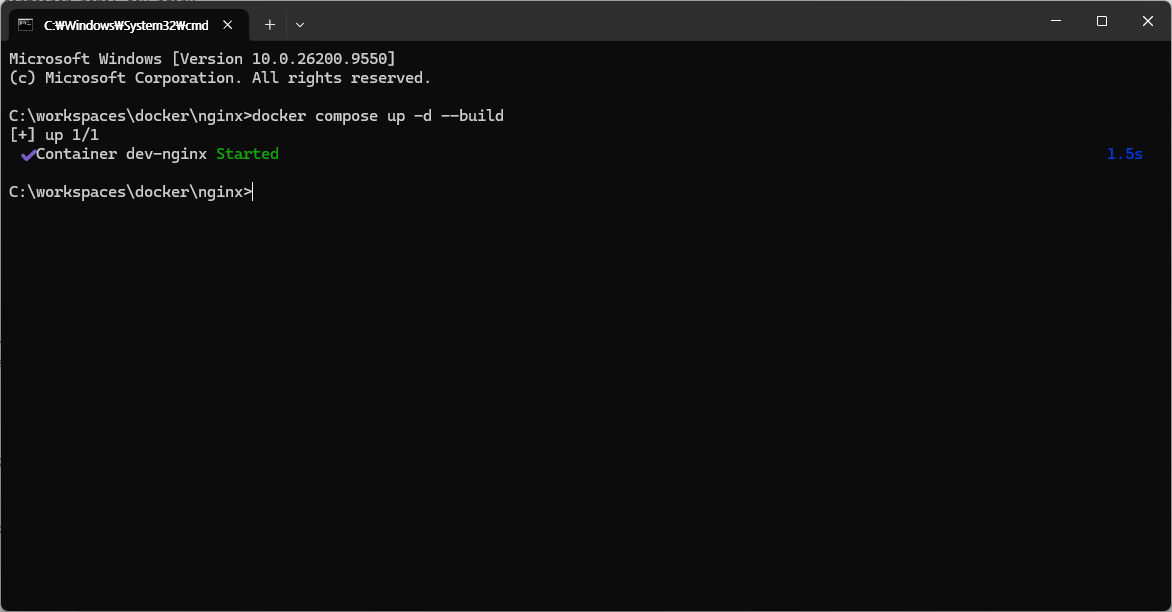
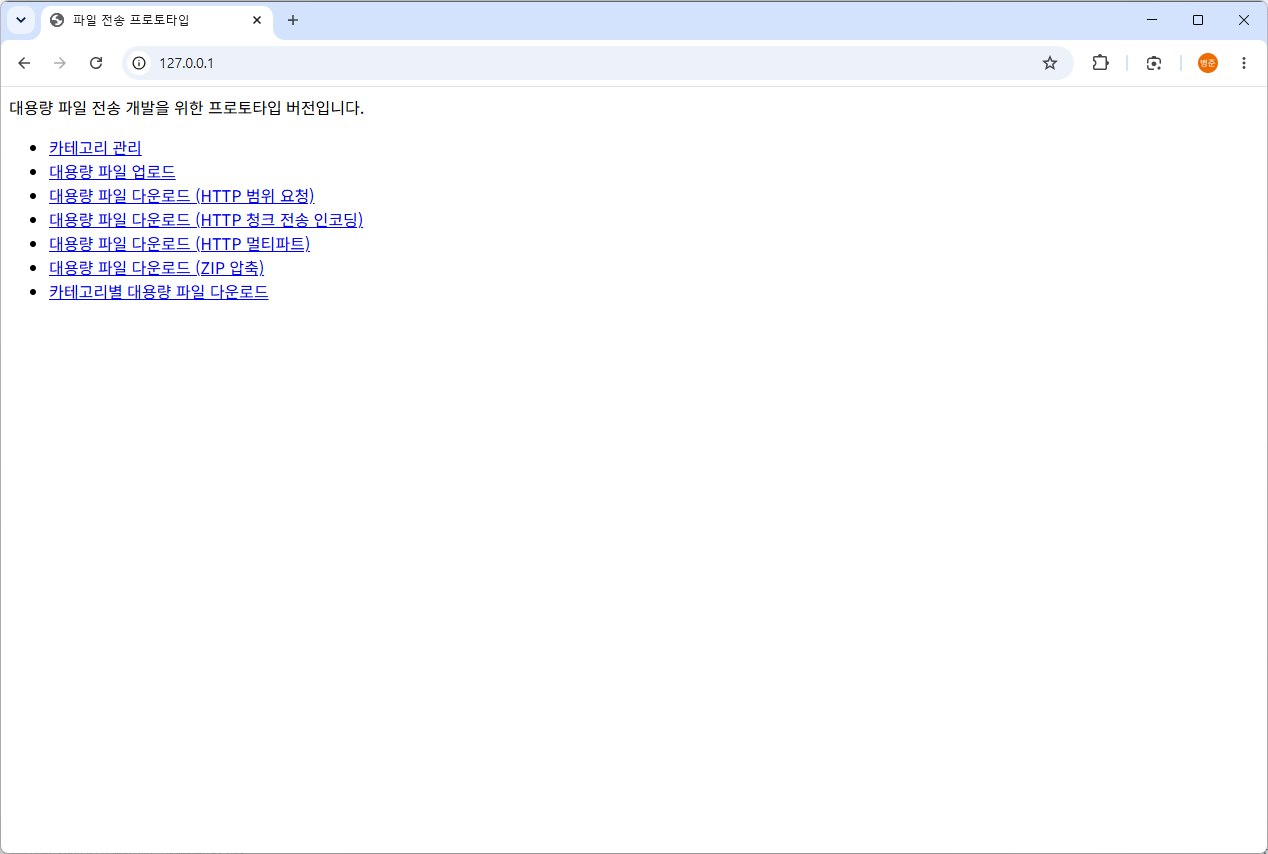
4. http://127.0.0.1으로 접속합니다. (기본 80 포트로 접속되어 처리됩니다.)
정상적으로 Nginx가 작동하는 것을 로그로 확인할 수 있습니다.
docker logs dev-nginx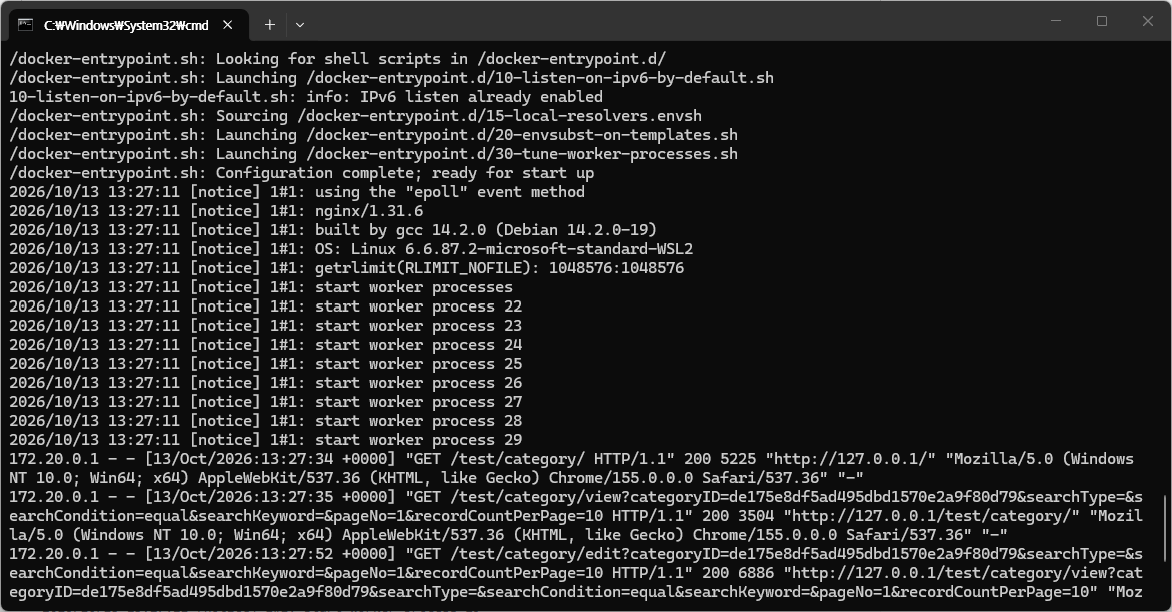
/docker-entrypoint.sh: Configuration complete; ready for start up
2026/10/13 13:27:11 [notice] 1#1: using the "epoll" event method
2026/10/13 13:27:11 [notice] 1#1: nginx/1.31.6
2026/10/13 13:27:11 [notice] 1#1: built by gcc 14.2.0 (Debian 14.2.0-19)
2026/10/13 13:27:11 [notice] 1#1: OS: Linux 6.6.87.2-microsoft-standard-WSL2
2026/10/13 13:27:11 [notice] 1#1: getrlimit(RLIMIT_NOFILE): 1048576:1048576
2026/10/13 13:27:11 [notice] 1#1: start worker processes
2026/10/13 13:27:11 [notice] 1#1: start worker process 22
2026/10/13 13:27:11 [notice] 1#1: start worker process 23
2026/10/13 13:27:11 [notice] 1#1: start worker process 24
2026/10/13 13:27:11 [notice] 1#1: start worker process 25
2026/10/13 13:27:11 [notice] 1#1: start worker process 26
2026/10/13 13:27:11 [notice] 1#1: start worker process 27
2026/10/13 13:27:11 [notice] 1#1: start worker process 28
2026/10/13 13:27:11 [notice] 1#1: start worker process 29
172.20.0.1 - - [13/Oct/2026:13:27:34 +0000] "GET /test/category/ HTTP/1.1" 200 5225 "http://127.0.0.1/" "Mozilla/5.0 (Windows NT 10.0; Win64; x64) AppleWebKit/537.36 (KHTML, like Gecko) Chrome/155.0.0.0 Safari/537.36" "-"
172.20.0.1 - - [13/Oct/2026:13:27:35 +0000] "GET /test/category/view?categoryID=de175e8df5ad495dbd1570e2a9f80d79&searchType=&searchCondition=equal&searchKeyword=&pageNo=1&recordCountPerPage=10 HTTP/1.1" 200 3504 "http://127.0.0.1/test/category/" "Mozilla/5.0 (Windows NT 10.0; Win64; x64) AppleWebKit/537.36 (KHTML, like Gecko) Chrome/155.0.0.0 Safari/537.36" "-"
172.20.0.1 - - [13/Oct/2026:13:27:52 +0000] "GET /test/category/edit?categoryID=de175e8df5ad495dbd1570e2a9f80d79&searchType=&searchCondition=equal&searchKeyword=&pageNo=1&recordCountPerPage=10 HTTP/1.1" 200 6886 "http://127.0.0.1/test/category/view?categoryID=de175e8df5ad495dbd1570e2a9f80d79&searchType=&searchCondition=equal&searchKeyword=&pageNo=1&recordCountPerPage=10" "Mozilla/5.0 (Windows NT 10.0; Win64; x64) AppleWebKit/537.36 (KHTML, like Gecko) Chrome/155.0.0.0 Safari/537.36" "-"
172.20.0.1 - - [13/Oct/2026:13:27:52 +0000] "GET /scripts/test/category/form.js HTTP/1.1" 200 1816 "http://127.0.0.1/test/category/edit?categoryID=de175e8df5ad495dbd1570e2a9f80d79&searchType=&searchCondition=equal&searchKeyword=&pageNo=1&recordCountPerPage=10" "Mozilla/5.0 (Windows NT 10.0; Win64; x64) AppleWebKit/537.36 (KHTML, like Gecko) Chrome/155.0.0.0 Safari/537.36" "-"
172.20.0.1 - - [13/Oct/2026:13:27:56 +0000] "POST /test/category/edit HTTP/1.1" 302 0 "http://127.0.0.1/test/category/edit?categoryID=de175e8df5ad495dbd1570e2a9f80d79&searchType=&searchCondition=equal&searchKeyword=&pageNo=1&recordCountPerPage=10" "Mozilla/5.0 (Windows NT 10.0; Win64; x64) AppleWebKit/537.36 (KHTML, like Gecko) Chrome/155.0.0.0 Safari/537.36" "-"
172.20.0.1 - - [13/Oct/2026:13:27:56 +0000] "GET /test/category/ HTTP/1.1" 200 5225 "http://127.0.0.1/test/category/edit?categoryID=de175e8df5ad495dbd1570e2a9f80d79&searchType=&searchCondition=equal&searchKeyword=&pageNo=1&recordCountPerPage=10" "Mozilla/5.0 (Windows NT 10.0; Win64; x64) AppleWebKit/537.36 (KHTML, like Gecko) Chrome/155.0.0.0 Safari/537.36" "-"
'Spring & Spring Boot > Nginx' 카테고리의 다른 글
| [6] Nginx(엔진 x) - 콘텐츠 캐시(Content Cache), 성능 개선 설정 (0) | 2026.10.15 |
|---|---|
| [5] Nginx(엔진 x) - 콘텐츠 캐시(Content Cache), 캐시 볼륨 시 오류 (0) | 2026.10.15 |
| [4] Nginx(엔진 x) - 콘텐츠 캐시(Content Cache) (0) | 2026.10.15 |
| [3] Nginx(엔진 x) - 정적 파일 분리 (0) | 2026.10.14 |
| [1] Nginx(엔진 x) - HTTP 웹 서버 (0) | 2026.10.14 |