카테고리별 파일 업로드 설정 관리는 게시판 기반 형태로 단순한 CRUD로 되어 있어 설명 없습니다. 소스만 보셔도 충분히 이해하실 겁니다.
카테고리별 파일 업로드 설정 관리 전체 소스
DB 테이블 생성
카테고리 테이블
카테고리와 업로드/다운로드의 파일 경로, 업로드 청크 크기, 전송 암호화 여부 등을 관리하는 테이블입니다.

1. DBeaver를 사용하여 SQL문을 실행합니다.
-- testdb.tb_category definition

CREATE TABLE `tb_category` (
  `SEQ` int NOT NULL AUTO_INCREMENT COMMENT '카테고리 시퀀스',
  `CATE_ID` varchar(32) CHARACTER SET utf8mb4 COLLATE utf8mb4_general_ci NOT NULL COMMENT '카테고리 ID',
  `CATE` varchar(50) CHARACTER SET utf8mb4 COLLATE utf8mb4_general_ci DEFAULT NULL COMMENT '카테고리',
  `UP_TEMP_FILE_PATH` varchar(256) CHARACTER SET utf8mb4 COLLATE utf8mb4_general_ci NOT NULL COMMENT '업로드 임시 파일 경로',
  `UP_FILE_PATH` varchar(256) CHARACTER SET utf8mb4 COLLATE utf8mb4_general_ci NOT NULL COMMENT '업로드 파일 경로',
  `UP_CHUNK_SIZE` int NOT NULL DEFAULT '0' COMMENT '업로드 청크 크기',
  `UP_USE_CRYPTO` tinyint DEFAULT '0' COMMENT '업로드 전송 암호화 사용 여부',
  `DOWN_TEMP_FILE_PATH` varchar(256) CHARACTER SET utf8mb4 COLLATE utf8mb4_general_ci NOT NULL COMMENT '다운로드 임시 파일 경로',
  `DOWN_CHUNK_SIZE` int NOT NULL DEFAULT '0' COMMENT '다운로드 청크 크기',
  `DOWN_USE_CRYPTO` tinyint DEFAULT '0' COMMENT '다운로드 전송 암호화 사용 여부',
  `REG_ID` varchar(100) CHARACTER SET utf8mb4 COLLATE utf8mb4_general_ci NOT NULL COMMENT '등록자',
  `REG_DTM` datetime NOT NULL DEFAULT CURRENT_TIMESTAMP COMMENT '등록일',
  `MOD_DTM` datetime DEFAULT NULL COMMENT '수정일',
  PRIMARY KEY (`SEQ`),
  UNIQUE KEY `TB_CATEGORY_unique` (`CATE_ID`)
) ENGINE=InnoDB AUTO_INCREMENT=1 DEFAULT CHARSET=utf8mb4 COLLATE=utf8mb4_general_ci;
2. 기초 데이터를 등록합니다.
3개의 카테고리를 등록합니다. (업로드 임시 파일 경로, 업로드 경로, 업로드 청크 크기, 압축/암호화 여부)
- test1 : Blob - 문서 파일
- test2 : Blob + GZip + 무결성 검증 (SHA) - 이미지 파일
- test3 : Blob + RSA + AES + 무결성 검증 (SHA) - 동영상 파일
- tb_category
INSERT INTO tb_category (CATE_ID, CATE, UP_TEMP_FILE_PATH, UP_FILE_PATH, UP_CHUNK_SIZE, UP_USE_CRYPTO, DOWN_TEMP_FILE_PATH, DOWN_CHUNK_SIZE, DOWN_USE_CRYPTO, REG_ID, REG_DTM, MOD_DTM) VALUES('de175e8df5ad495dbd1570e2a9f80d79', 'test1', 'C:/tempUpload/temp', 'C:/tempUpload/data', 10240, 0, 'C:/tempDownload/temp', 10240, 0, 'SYSTEM', '2024-12-30 12:00:00.000', NULL);
INSERT INTO tb_category (CATE_ID, CATE, UP_TEMP_FILE_PATH, UP_FILE_PATH, UP_CHUNK_SIZE, UP_USE_CRYPTO, DOWN_TEMP_FILE_PATH, DOWN_CHUNK_SIZE, DOWN_USE_CRYPTO, REG_ID, REG_DTM, MOD_DTM) VALUES('61c6e13f475f487a972153ecfa49884d', 'test2', 'C:/tempUpload/temp', 'C:/tempUpload/data', 10240, 1, 'C:/tempDownload/temp', 10240, 0, 'SYSTEM', '2024-12-30 12:00:00.000', NULL);
INSERT INTO tb_category (CATE_ID, CATE, UP_TEMP_FILE_PATH, UP_FILE_PATH, UP_CHUNK_SIZE, UP_USE_CRYPTO, DOWN_TEMP_FILE_PATH, DOWN_CHUNK_SIZE, DOWN_USE_CRYPTO, REG_ID, REG_DTM, MOD_DTM) VALUES('49a96e2f6c474a75af480aa7ea12e257', 'test3', 'C:/tempUpload/temp', 'C:/tempUpload/data', 1048576, 2, 'C:/tempDownload/temp', 102400, 0, 'SYSTEM', '2024-12-30 12:00:00.000', NULL);
소스 경로
transmission
+src
+main
+java
+com
+example
+transmission
+model
Category.java
CategorySearch.java
Goto.java
+mapper
+mariadb
ICategoryMapper.java
+service
+impl
CategoryServiceImpl.java
ICategoryService.java
+controller
GategoryController.java
+resources
+mapper
+mariadb
CategoryMapper.xml
+webapp
+views
+test
+category
index.jsp
+css
common.css
+scripts
+category
index.js
모델 생성
1. transmission\src\main\java\com\example\transmission\model\Category.java를 생성합니다.
package com.example.transmission.model;

import com.example.transmission.base.model.BaseEntity;
import jakarta.validation.constraints.*;
import org.hibernate.validator.constraints.Range;

/**
 * ClassName : com.example.transmission.model.Category
 * Description : Category는 업로드와 다운로드에 대한 환경 설정 정보 클래스입니다.
 * Author : carrotweb(Byung-Joon, Kang)
 * Date : 2024-12-31
 * History :
 * - 작성자 : carrotweb(Byung-Joon, Kang), 날짜 : 2024-12-31, 설명 : 최초작성
 */
public class Category extends BaseEntity {

    private static final long serialVersionUID = -8062018625665163426L;

    /**
     * 카테고리 시퀀스
     */
    private int seq = 0;

    /**
     * 카테고리 ID
     */
    private String categoryID = "";

    /**
     * 카테고리
     */
    @NotNull(message="카테고리 명을 입력하세요.")
    @NotEmpty(message="카테고리 명을 입력하세요..")
    @Size(min = 1, max = 50, message="카테고리 명은 최소 1자, 최대 50자 이내로 입력하세요.")
    private String category = "";

    /**
     * 업로드 임시 파일 경로
     */
    @NotNull(message="업로드 임시 파일 경로를 입력하세요.")
    @NotEmpty(message="업로드 임시 파일 경로를 입력하세요..")
    @Size(min = 1, max = 256, message="업로드 임시 파일 경로는 최소 1자, 최대 256자 이내로 입력하세요.")
    private String upTempFilePath = "";

    /**
     * 업로드 파일 경로
     */
    @NotNull(message="업로드 파일 경로를 입력하세요.")
    @NotEmpty(message="업로드 파일 경로를 입력하세요..")
    @Size(min = 1, max = 256, message="업로드 파일 경로는 최소 1자, 최대 256자 이내로 입력하세요.")
    private String upFilePath = "";

    /**
     * 업로드 청크 크기
     */
    @Range(min = 1024, max = 1048576, message = "업로드 청크 크기는 최소 1024(1KB)이상 최대 1048576(1MB)이하이어야 합니다.")
    private int upChunkSize = 1024;

    /**
     * 업로드 전송 암호화 사용 여부
     */
    @Range(min = 0, max = 2, message = "업로드 전송 암호화는 0:Blob 전송, 1:Blob + 검증 + 압축 전송, 2:Blob + 암호화 + 검증 전송만 지원합니다.")
    private int upUseCrypto = 0;

    /**
     * 다운로드 임시 파일 경로
     */
    @NotNull(message="다운로드 임시 파일 경로를 입력하세요.")
    @NotEmpty(message="다운로드 임시 파일 경로를 입력하세요..")
    @Size(min = 1, max = 256, message="다운로드 임시 파일 경로는 최소 1자, 최대 256자 이내로 입력하세요.")
    private String downTempFilePath = "";

    /**
     * 다운로드 청크 크기
     */
    @Range(min = 1024, max = 1048576, message = "다운로드 청크 크기는 최소 1024(1KB)이상 최대 1048576(1MB)이하이어야 합니다.")
    private int downChunkSize = 1024;

    /**
     * 다운로드 전송 암호화 사용 여부
     */
    @Range(min = 0, max = 0, message = "다운로드 전송 암호화는 0:Base64 전송만 지원합니다.")
    private int downUseCrypto = 0;

    public int getSeq() {
        return seq;
    }

    public void setSeq(int seq) {
        this.seq = seq;
    }

    public String getCategoryID() {
        return categoryID;
    }

    public void setCategoryID(String categoryID) {
        this.categoryID = categoryID;
    }

    public String getCategory() {
        return category;
    }

    public void setCategory(String category) {
        this.category = category;
    }

    public String getUpTempFilePath() {
        return upTempFilePath;
    }

    public void setUpTempFilePath(String upTempFilePath) {
        this.upTempFilePath = upTempFilePath;
    }

    public String getUpFilePath() {
        return upFilePath;
    }

    public void setUpFilePath(String upFilePath) {
        this.upFilePath = upFilePath;
    }

    public int getUpChunkSize() {
        return upChunkSize;
    }

    public void setUpChunkSize(int upChunkSize) {
        this.upChunkSize = upChunkSize;
    }

    public int getUpUseCrypto() {
        return upUseCrypto;
    }

    public void setUpUseCrypto(int upUseCrypto) {
        this.upUseCrypto = upUseCrypto;
    }

    public String getDownTempFilePath() {
        return downTempFilePath;
    }

    public void setDownTempFilePath(String downTempFilePath) {
        this.downTempFilePath = downTempFilePath;
    }

    public int getDownChunkSize() {
        return downChunkSize;
    }

    public void setDownChunkSize(int downChunkSize) {
        this.downChunkSize = downChunkSize;
    }

    public int getDownUseCrypto() {
        return downUseCrypto;
    }

    public void setDownUseCrypto(int downUseCrypto) {
        this.downUseCrypto = downUseCrypto;
    }
}
2. transmission\src\main\java\com\example\transmission\model\CategorySearch.java를 생성합니다.
package com.example.transmission.model;

import com.example.transmission.base.search.Search;

import java.util.List;


/**
 * ClassName : com.example.transmission.model.CategorySearch
 * Description : CategorySearch는 업로드된 파일을 검색하는 클래스입니다.
 * Author : carrotweb(Byung-Joon, Kang)
 * Date : 2025-01-03
 * History :
 * - 작성자 : carrotweb(Byung-Joon, Kang), 날짜 : 2025-01-03, 설명 : 최초작성
 */
public class CategorySearch extends Search {

    private static final long serialVersionUID = 1172153398280924619L;

    /**
     * 카테고리 ID
     */
    private String categoryID = "";

    /**
     * 검색 결과 - 카테고리 리스트
     */
    private List<Category> resultList = null;

    public String getCategoryID() {
        return categoryID;
    }

    public void setCategoryID(String categoryID) {
        this.categoryID = categoryID;
    }

    public List<Category> getResultList() {
        return resultList;
    }

    public void setResultList(List<Category> resultList) {
        this.resultList = resultList;
    }
}
3. transmission\src\main\java\com\example\transmission\model\Goto.java를 생성합니다.
package com.example.transmission.model;

import java.io.Serializable;

/**
 * ClassName : com.example.transmission.model.Goto
 * Description : Goto는 목록 이동 정보 클래스입니다.
 * Author : carrotweb(Byung-Joon, Kang)
 * Date : 2025-01-03
 * History :
 * - 작성자 : carrotweb(Byung-Joon, Kang), 날짜 : 2025-01-03, 설명 : 최초작성
 */
public class Goto implements Serializable {

    private static final long serialVersionUID = 7646660384282808523L;

    /**
     * 검색 타입
     */
    private String searchType = "";

    /**
     * 검색 조건
     */
    private String searchCondition = "";

    /**
     * 검색 키워드
     */
    private String searchKeyword = "";

    /**
     * 페이지 번호
     */
    private int pageNo = 1;

    /**
     * 페이지 레코드 수(기본값 : 10)
     */
    protected int recordCountPerPage = 10;

    public String getSearchType() {
        return searchType;
    }

    public void setSearchType(String searchType) {
        this.searchType = searchType;
    }

    public String getSearchCondition() {
        return searchCondition;
    }

    public void setSearchCondition(String searchCondition) {
        this.searchCondition = searchCondition;
    }

    public String getSearchKeyword() {
        return searchKeyword;
    }

    public void setSearchKeyword(String searchKeyword) {
        this.searchKeyword = searchKeyword;
    }

    public int getPageNo() {
        return pageNo;
    }

    public void setPageNo(int pageNo) {
        this.pageNo = pageNo;
    }

    public int getRecordCountPerPage() {
        return recordCountPerPage;
    }

    public void setRecordCountPerPage(int recordCountPerPage) {
        this.recordCountPerPage = recordCountPerPage;
    }
}
매퍼 생성
1. transmission\src\main\resources\mapper\mariadb\CategoryMapper.xml를 생성합니다.
<?xml version="1.0" encoding="UTF-8" ?>
<!DOCTYPE mapper PUBLIC "-//mybatis.org//DTD Mapper 3.0//EN"
        "http://mybatis.org/dtd/mybatis-3-mapper.dtd">

<mapper namespace="com.example.transmission.mapper.mariadb.ICategoryMapper">
    <!--
        카테고리를 등록합니다.
    -->
    <insert id="insertCategoryItem" useGeneratedKeys="true" keyProperty="seq" parameterType="com.example.transmission.model.Category">
        INSERT INTO TB_CATEGORY
        (
            CATE_ID,
            CATE,
            UP_TEMP_FILE_PATH,
            UP_FILE_PATH,
            UP_CHUNK_SIZE,
            UP_USE_CRYPTO,
            DOWN_TEMP_FILE_PATH,
            DOWN_CHUNK_SIZE,
            DOWN_USE_CRYPTO,
            REG_ID
        )
        VALUES
        (
            #{categoryID},
            #{category},
            #{upTempFilePath},
            #{upFilePath},
            #{upChunkSize},
            #{upUseCrypto},
            #{downTempFilePath},
            #{downChunkSize},
            #{downUseCrypto},
            #{regID}
        );
    </insert>

    <!--
        카테고리 리스트 검색 조건
    -->
    <sql id="whereCategoryListSearch">
        <where>
            1=1
            <if test='searchKeyword != null and searchKeyword != ""'>
                <choose>
                    <when test='searchType != null and searchType == "categoryName"'>
                        <choose>
                            <when test='searchCondition != null and searchCondition == "like"'>
                                AND A.CATE LIKE CONCAT('%',#{searchKeyword},'%')
                            </when>
                            <otherwise>
                                AND A.CATE = #{searchKeyword}
                            </otherwise>
                        </choose>
                    </when>
                </choose>
            </if>
        </where>
    </sql>

    <!--
        카테고리 맵
    -->
    <resultMap id="CategoryMap" type="com.example.transmission.model.Category">
        <result column="SEQ" property="seq"/>
        <result column="CATE_ID" property="categoryID"/>
        <result column="CATE" property="category"/>
        <result column="UP_TEMP_FILE_PATH" property="upTempFilePath"/>
        <result column="UP_FILE_PATH" property="upFilePath"/>
        <result column="UP_CHUNK_SIZE" property="upChunkSize"/>
        <result column="UP_USE_CRYPTO" property="upUseCrypto"/>
        <result column="DOWN_TEMP_FILE_PATH" property="downTempFilePath"/>
        <result column="DOWN_CHUNK_SIZE" property="downChunkSize"/>
        <result column="DOWN_USE_CRYPTO" property="downUseCrypto"/>
        <result column="REG_ID" property="regID"/>
        <result column="REG_DTM" property="regDate"/>
        <result column="MOD_DTM" property="modDate"/>
    </resultMap>

    <!--
        카테고리 리스트 개수를 조회합니다.
    -->
    <select id="selectCategoryListCount" parameterType="com.example.transmission.model.CategorySearch" resultType="int">
        SELECT COUNT(A.SEQ)
          FROM TB_CATEGORY A
        <include refid="whereCategoryListSearch"/>
    </select>

    <!--
        카테고리 리스트를 조회합니다.
    -->
    <select id="selectCategoryList" parameterType="com.example.transmission.model.CategorySearch" resultMap="CategoryMap">
        SELECT A.CATE_ID,
               A.CATE,
               A.REG_DTM
          FROM TB_CATEGORY A
        <include refid="whereCategoryListSearch"/>
         ORDER BY A.REG_DTM DESC
        <if test="pagination != null">
         LIMIT #{pagination.pageStartRecordNo}, #{pagination.recordCountPerPage}
        </if>
    </select>

    <!--
        카테고리를 조회합니다.
    -->
    <select id="selectCategoryItem" parameterType="com.example.transmission.model.CategorySearch" resultMap="CategoryMap">
        SELECT CATE_ID,
               CATE,
               UP_TEMP_FILE_PATH,
               UP_FILE_PATH,
               UP_CHUNK_SIZE,
               UP_USE_CRYPTO,
               DOWN_TEMP_FILE_PATH,
               DOWN_CHUNK_SIZE,
               DOWN_USE_CRYPTO
          FROM TB_CATEGORY
         WHERE CATE_ID = #{categoryID}
    </select>

    <!--
        카테고리 업로드 정보를 조회합니다.
    -->
    <select id="selectCategoryUpItem" parameterType="com.example.transmission.model.Category" resultMap="CategoryMap">
        SELECT UP_TEMP_FILE_PATH,
               UP_FILE_PATH,
               UP_CHUNK_SIZE,
               UP_USE_CRYPTO
          FROM TB_CATEGORY
         WHERE CATE_ID = #{categoryID}
    </select>

    <!--
        카테고리 다운로드 정보를 조회합니다.
    -->
    <select id="selectCategoryDownItem" parameterType="com.example.transmission.model.Category" resultMap="CategoryMap">
        SELECT DOWN_TEMP_FILE_PATH,
               DOWN_CHUNK_SIZE,
               DOWN_USE_CRYPTO
          FROM TB_CATEGORY
         WHERE CATE_ID = #{categoryID}
    </select>

    <!--
        카테고리를 수정합니다.
    -->
    <update id="updateCategoryItem" parameterType="com.example.transmission.model.Category">
        UPDATE TB_CATEGORY
           SET CATE = #{category},
               UP_TEMP_FILE_PATH = #{upTempFilePath},
               UP_FILE_PATH = #{upFilePath},
               UP_CHUNK_SIZE = #{upChunkSize},
               UP_USE_CRYPTO = #{upUseCrypto},
               DOWN_TEMP_FILE_PATH = #{downTempFilePath},
               DOWN_CHUNK_SIZE = #{downChunkSize},
               DOWN_USE_CRYPTO = #{downUseCrypto},
               MOD_DTM = NOW()
        WHERE CATE_ID = #{categoryID}
    </update>

    <!--
        카테고리를 삭제합니다.
    -->
    <delete id="deleteCategoryItem" parameterType="com.example.transmission.model.Category">
        DELETE
          FROM TB_CATEGORY
         WHERE CATE_ID = #{categoryID}
    </delete>
</mapper>
2. transmission\src\main\java\com\example\transmission\mapper\mariadb\ICategoryMapper.java를 생성합니다.
package com.example.transmission.mapper.mariadb;

import com.example.transmission.model.Category;
import com.example.transmission.model.CategorySearch;
import org.apache.ibatis.annotations.Mapper;

import java.util.List;

/**
 * ClassName : com.example.transmission.mapper.mariadb.ICategoryMapper
 * Description : ICategoryMapper는 카테고리를 처리하는 매퍼 인터페이스입니다.
 * Author : carrotweb(Byung-Joon, Kang)
 * Date : 2024-12-31
 * History :
 * - 작성자 : carrotweb(Byung-Joon, Kang), 날짜 : 2024-12-31, 설명 : 최초작성
 */
@Mapper
public interface ICategoryMapper {

    /**
     * 카테고리를 등록합니다.
     * @param category 카테고리
     * @return 처리 수
     */
    int insertCategoryItem(Category category);

    /**
     * 카테고리 리스트 개수를 조회합니다.
     * @param categorySearch 카테고리 검색
     * @return 검색된 개수
     */
    int selectCategoryListCount(CategorySearch categorySearch);

    /**
     * 카테고리 리스트를 조회합니다.
     * @param categorySearch 카테고리 검색
     * @return 카테고리 리스트
     */
    List<Category> selectCategoryList(CategorySearch categorySearch);

    /**
     * 카테고리를 조회합니다.
     * @param categorySearch 카테고리 검색
     * @return 카테고리
     */
    Category selectCategoryItem(CategorySearch categorySearch);

    /**
     * 카테고리 업로드 정보를 조회합니다.
     * @param category 카테고리
     * @return 카테고리 업로드 정보
     */
    Category selectCategoryUpItem(Category category);

    /**
     * 카테고리 다운로드 정보를 조회합니다.
     * @param category 카테고리
     * @return 카테고리 다운로드 정보
     */
    Category selectCategoryDownItem(Category category);

    /**
     * 카테고리를 수정합니다.
     * @param category 카테고리
     * @return 처리 수
     */
    int updateCategoryItem(Category category);

    /**
     * 카테고리를 삭제합니다.
     * @param category 카테고리
     * @return 처리 수
     */
    int deleteCategoryItem(Category category);
}
서비스 생성
1. transmission\src\main\java\com\example\transmission\service\ICategoryService.java를 생성합니다.
package com.example.transmission.service;

import com.example.transmission.model.Category;
import com.example.transmission.model.CategorySearch;

import java.util.List;

/**
 * ClassName : com.example.transmission.service.ICategoryService
 * Description : ICategoryService는 업로드된 파일을 처리하는 서비스 인터페이스입니다.
 * Author : carrotweb(Byung-Joon, Kang)
 * Date : 2025-01-03
 * History :
 * - 작성자 : carrotweb(Byung-Joon, Kang), 날짜 : 2025-01-03, 설명 : 최초작성
 */
public interface ICategoryService {

    /**
     * 카테고리를 등록합니다.
     * @param category 카테고리
     * @return 처리 여부
     */
    public abstract boolean insertCategoryItem(Category category);

    /**
     * 카테고리 목록을 조회합니다.
     * @param categorySearch 카테고리 검색
     * @return 카테고리 검색 (검색 결과 - 카테고리 리스트)
     */
    public abstract CategorySearch selectCategoryList(CategorySearch categorySearch);

    /**
     * 카테고리를 조회합니다.
     * @param categorySearch 카테고리 검색
     * @return 카테고리
     */
    public abstract Category selectCategoryItem(CategorySearch categorySearch);


    /**
     * 카테고리를 수정합니다.
     * @param category 카테고리
     * @return 처리 여부
     */
    public abstract boolean updateCategoryItem(Category category);

    /**
     * 카테고리를 삭제합니다.
     * @param category 카테고리
     * @return 처리 여부
     */
    public abstract boolean deleteCategoryItem(Category category);
}
2. transmission\src\main\java\com\example\transmission\service\impl\CategoryServiceImpl.java를 생성합니다.
package com.example.transmission.service.impl;

import com.example.transmission.base.search.Pagination;
import com.example.transmission.mapper.mariadb.ICategoryMapper;
import com.example.transmission.model.Category;
import com.example.transmission.model.CategorySearch;
import com.example.transmission.service.ICategoryService;
import org.springframework.beans.factory.annotation.Autowired;
import org.springframework.stereotype.Service;

import java.util.List;

/**
 * ClassName : com.example.transmission.service.impl.CategoryServiceImpl
 * Description : CategoryServiceImpl은 카테고리를 처리하는 서비스 구현체입니다.
 * Author : carrotweb(Byung-Joon, Kang)
 * Date : 2025-01-03
 * History :
 * - 작성자 : carrotweb(Byung-Joon, Kang), 날짜 : 2025-01-03, 설명 : 최초작성
 */
@Service
public class CategoryServiceImpl implements ICategoryService {

    @Autowired
    private ICategoryMapper categoryMapper;

    @Override
    public boolean insertCategoryItem(Category category) {
        return categoryMapper.insertCategoryItem(category) == 1;
    }

    @Override
    public CategorySearch selectCategoryList(CategorySearch categorySearch) {
        if (categorySearch.getPagination() == null) {
            categorySearch.setPagination(new Pagination());
        }

        int count = categoryMapper.selectCategoryListCount(categorySearch);
        categorySearch.getPagination().setRecordTotalCount(count);

        List<Category> categoryList = null;
        if (count > 0) {
            categorySearch.getPagination().processZero();
            categoryList = categoryMapper.selectCategoryList(categorySearch);
            categorySearch.setResultList(categoryList);
        }
        return categorySearch;
    }

    @Override
    public Category selectCategoryItem(CategorySearch categorySearch) {
        return categoryMapper.selectCategoryItem(categorySearch);
    }

    @Override
    public boolean updateCategoryItem(Category category) {
        return categoryMapper.updateCategoryItem(category) == 1;
    }

    @Override
    public boolean deleteCategoryItem(Category category) {
        return categoryMapper.deleteCategoryItem(category) == 1;
    }
}
컨트롤생성
1. transmission\src\main\java\com\example\transmission\controller\GategoryController.java를 생성합니다.
package com.example.transmission.controller;

import com.example.transmission.base.search.Pagination;
import com.example.transmission.model.Category;
import com.example.transmission.model.CategorySearch;
import com.example.transmission.model.Goto;
import com.example.transmission.service.ICategoryService;
import jakarta.servlet.http.HttpServletRequest;
import jakarta.servlet.http.HttpServletResponse;
import jakarta.validation.Valid;
import org.springframework.beans.factory.annotation.Autowired;
import org.springframework.stereotype.Controller;
import org.springframework.ui.ModelMap;
import org.springframework.validation.BindingResult;
import org.springframework.web.bind.annotation.ModelAttribute;
import org.springframework.web.bind.annotation.RequestMapping;
import org.springframework.web.bind.annotation.RequestMethod;

import java.io.UnsupportedEncodingException;
import java.net.URLDecoder;
import java.util.UUID;

/**
 * ClassName : com.example.transmission.controller.GategoryController
 * Description : GategoryController은 카테고리를 관리하는 컨트롤입니다.
 * Author : carrotweb(Byung-Joon, Kang)
 * Date : 2025-01-03
 * History :
 * - 작성자 : carrotweb(Byung-Joon, Kang), 날짜 : 2025-01-03, 설명 : 최초작성
 */
@Controller
@RequestMapping("/test/category")
public class GategoryController {

    @Autowired
    private ICategoryService categoryService;

    @RequestMapping(value = "/", method = {RequestMethod.GET, RequestMethod.POST})
    public String index(HttpServletRequest req, HttpServletResponse resp,
                        @ModelAttribute("categorySearch") CategorySearch categorySearch,
                        @ModelAttribute("gotoForm") Goto gotoForm, ModelMap model) {

        if (categorySearch.getPagination() == null) {
            Pagination pagination = new Pagination();
            pagination.setPageNo(gotoForm.getPageNo());
            pagination.setRecordCountPerPage(gotoForm.getRecordCountPerPage());
            categorySearch.setPagination(pagination);
        }
        if (!gotoForm.getSearchType().isEmpty()) {
            categorySearch.setSearchType(gotoForm.getSearchType());
        }
        if (!gotoForm.getSearchCondition().isEmpty()) {
            categorySearch.setSearchCondition(gotoForm.getSearchCondition());
        }
        if (!gotoForm.getSearchKeyword().isEmpty()) {
            String searchKeyword = "";
            try {
                searchKeyword = URLDecoder.decode(gotoForm.getSearchKeyword(), "UTF-8");
            } catch (UnsupportedEncodingException e) {
            }
            categorySearch.setSearchKeyword(searchKeyword);
        }
        categorySearch = categoryService.selectCategoryList(categorySearch);
        return "test/category/index";
    }

    @RequestMapping(value = "/add", method = RequestMethod.GET)
    public String add(HttpServletRequest req, HttpServletResponse resp,
                      @ModelAttribute("categoryForm") Category category,
                      @ModelAttribute("gotoForm") Goto gotoForm, ModelMap model) {

        model.addAttribute("mode", "add");

        return "test/category/form";
    }

    @RequestMapping(value = "/add", method = RequestMethod.POST)
    public String addForm(HttpServletRequest req, HttpServletResponse resp,
                          @Valid @ModelAttribute("categoryForm") Category category,
                          BindingResult bindingResult, ModelMap model) {

        model.addAttribute("mode", "add");

        // 테스트 - 검증 에러 추가
        //bindingResult.addError(new FieldError("categoryForm", "downUseCrypto", 0, false, new String[]{"range.downUseCrypto"}, new Object[]{0, 2}, "에러"));
        if (bindingResult.hasErrors()) {
            /*
            List<FieldError> fieldsErrors = bindingResult.getFieldErrors();
            for (FieldError fieldError : fieldsErrors) {
                System.out.println(fieldError.getField() + " = " + fieldError.getCode() + " / " + fieldError.getDefaultMessage());
            }
            */
            return "test/category/form";
        }

        String categoryID = UUID.randomUUID().toString().replaceAll("-", "");
        category.setCategoryID(categoryID);
        // 임시 계정
        category.setRegID("SYSTEM");
        if (!categoryService.insertCategoryItem(category)) {
            return "test/category/form";
        }

        return "redirect:/test/category/";
    }

    @RequestMapping(value = "/view", method = RequestMethod.GET)
    public String view(HttpServletRequest req, HttpServletResponse resp,
                       @ModelAttribute CategorySearch categorySearch,
                       @ModelAttribute("gotoForm") Goto gotoForm, ModelMap model) {

        Category categoryItem = categoryService.selectCategoryItem(categorySearch);
        model.addAttribute("categoryItem", categoryItem);

        return "test/category/view";
    }

    @RequestMapping(value = "/edit", method = RequestMethod.GET)
    public String edit(HttpServletRequest req, HttpServletResponse resp,
                       @ModelAttribute CategorySearch categorySearch,
                       @ModelAttribute("gotoForm") Goto gotoForm, ModelMap model) {

        model.addAttribute("mode", "edit");

        Category categoryItem = categoryService.selectCategoryItem(categorySearch);
        model.addAttribute("categoryForm", categoryItem);

        return "test/category/form";
    }

    @RequestMapping(value = "/edit", method = RequestMethod.POST)
    public String editForm(HttpServletRequest req, HttpServletResponse resp,
                           @Valid @ModelAttribute("categoryForm") Category category,
                           BindingResult bindingResult, ModelMap model) {

        model.addAttribute("mode", "edit");

        if (bindingResult.hasErrors()) {
            return "test/category/form";
        }

        if (!categoryService.updateCategoryItem(category)) {
            return "test/category/form";
        }

        return "redirect:/test/category/";
    }

    @RequestMapping(value = "/remove", method = RequestMethod.POST)
    public String remove(HttpServletRequest req, HttpServletResponse resp,
                         @ModelAttribute Category category, ModelMap model) {

        if (!categoryService.deleteCategoryItem(category)) {
            CategorySearch categorySearch = new CategorySearch();
            categorySearch.setCategoryID(category.getCategoryID());
            Category categoryItem = categoryService.selectCategoryItem(categorySearch);
            model.addAttribute("categoryItem", categoryItem);
            return "test/category/view";
        }

        return "redirect:/test/category/";
    }
}
뷰 생성
1. transmission\src\main\webapp\WEB-INF\views\test\category\index.jsp를 생성합니다.
<%@ page language="java" contentType="text/html; charset=UTF-8" pageEncoding="UTF-8"%>
<%@ taglib uri="http://java.sun.com/jsp/jstl/core" prefix="c"%>
<%@ taglib uri="http://www.springframework.org/tags/form" prefix="form"%>
<!DOCTYPE html>
<html>
<head>
<title>카테고리 관리</title>
<link rel="stylesheet" type="text/css" href="/css/common.css">
<script src="https://code.jquery.com/jquery-3.7.1.min.js" integrity="sha256-/JqT3SQfawRcv/BIHPThkBvs0OEvtFFmqPF/lYI/Cxo=" crossorigin="anonymous"></script>
</head>
<body>
<div class="basicLayout">
<div class="buttons">
<div class="right">
<button id="addCategoryBtn" class="button blue">등록</button>
</div>
</div>
<form id="gotoForm" method="GET">
<input type="hidden" name="pageNo" value="${categorySearch.pagination.pageNo}">
<input type="hidden" name="recordCountPerPage" value="${categorySearch.pagination.recordCountPerPage}">
</form>
<form:form modelAttribute="categorySearch" autocomplete="off">
<form:hidden path="pagination.pageNo" />
<form:hidden path="pagination.pageLastNo" />
<div>
검색 조건 :
<form:select path="searchType">
<form:option value="" label="전체" />
<form:option value="categoryName" label="카테고리명" />
</form:select>
<form:select path="searchCondition">
<form:option value="equal" label="일치" />
<form:option value="like" label="포함" />
</form:select>
<form:input path="searchKeyword" placeholder="검색할 키워드를 입력하세요." />
<button id="searchBtn" type="button">검색</button>
</div>
<div class="search-result">
<div>
검색 결과 : ${categorySearch.pagination.recordTotalCount}건
</div>
<div>
<form:select path="pagination.recordCountPerPage">
<form:option value="1" label="1" />
<form:option value="2" label="2" />
<form:option value="3" label="3" />
<form:option value="5" label="5" />
<form:option value="10" label="10" />
</form:select>
</div>
</div>
</form:form>
<table class="list">
<colgroup>
<col style="width:10%">
<col style="width:*">
<col style="width:25%">
</colgroup>
<thead>
<tr>
<th scope="col">번호</th>
<th scope="col">카테고리</th>
<th scope="col">등록일</th>
</tr>
</thead>
<tbody>
<c:choose>
<c:when test="${empty categorySearch.resultList}">
<tr><td colspan="3">검색된 카테고리가 없습니다.</td></tr>
</c:when>
<c:otherwise>
<c:forEach var="resultItem" items="${categorySearch.resultList}" varStatus="status">
<tr class="item" data-value="${resultItem.categoryID}">
<td>${categorySearch.pagination.recordTotalCount - ((categorySearch.pagination.pageNo - 1) * categorySearch.pagination.recordCountPerPage) - status.count + 1}</td>
<td>${resultItem.category}</td>
<td>${resultItem.regDate}</td>
</tr>
</c:forEach>
</c:otherwise>
</c:choose>
</tbody>
</table>
<c:if test="${not empty categorySearch.resultList}">
<div>
<ul id="boardPagination" class="pagination">
<li class="page-item<c:if test="${!categorySearch.pagination.isEnablePageFirstNo()}"> disabled</c:if>"><a class="page-link page-first" data-pageno="1" href="javascript:void(0)">First</a></li>
<li class="page-item<c:if test="${!categorySearch.pagination.isEnablePrevPageSizeNo()}"> disabled</c:if>"><a class="page-link page-prev" data-pageno="${categorySearch.pagination.pageStartNo - 1}" href="javascript:void(0)"><</a></li>
<c:forEach var="page" begin="${categorySearch.pagination.pageStartNo}" end="${categorySearch.pagination.pageEndNo}" step="1">
<li class="page-item<c:if test="${categorySearch.pagination.pageNo == page}"> active</c:if>">
<a class="page-link page-no" data-pageno="${page}" href="javascript:void(0)">${page}</a>
</li>
</c:forEach>
<li class="page-item<c:if test="${!categorySearch.pagination.isEnableNextPageSizeNo()}"> disabled</c:if>"><a class="page-link page-next" data-pageno="${categorySearch.pagination.pageEndNo + 1}" href="javascript:void(0)">></a></li>
<li class="page-item<c:if test="${!categorySearch.pagination.isEnablePageLastNo()}"> disabled</c:if>"><a class="page-link page-last" data-pageno="${categorySearch.pagination.pageLastNo}" href="javascript:void(0)">Last</a></li>
</ul>
</div>
</c:if>
</div>
<script src="/scripts/test/category/index.js"></script>
</body>
</html>
2. transmission\src\main\webapp\css\common.css를 생성합니다.
.basicLayout { width:800px; margin: 20px auto; }

.btn {display: inline-block; font-weight: 400; text-align: center; white-space: nowrap; vertical-align: middle; -webkit-user-select: none; -moz-user-select: none; -ms-user-select: none; user-select: none; border: 1px solid transparent; padding: .375rem .75rem; font-size: 1rem; line-height: 1.5; border-radius: .25rem; transition: color .15s ease-in-out, background-color .15s ease-in-out, border-color .15s ease-in-out, box-shadow .15s ease-in-out;}
.btn-sm {padding: .25rem .5rem; font-size: .875rem; line-height: 1.5; border-radius: .2rem;}
.btn-primary {color: #fff; background-color: #007bff; border-color: #007bff;}
.btn-secondary {color: #fff; background-color: #6c757d; border-color: #6c757d;}
.btn-success {color: #fff; background-color: #28a745; border-color: #28a745;}
.btn-danger {color: #fff; background-color: #dc3545; border-color: #dc3545;}
.btn-warning {color: #212529; background-color: #ffc107; border-color: #ffc107;}

form { margin-bottom: 10px; }
form > div { margin-bottom: 10px; }
form select { padding: 4px 4px; }
form input[type="text"] { padding: 4px 4px; width: 200px; }
form button { display: inline-flex; height: 27px; font-size: 14px; }
form .search-result { display: flex; justify-content: space-between; }

table { width: 100%; border-top: 2px solid #1d4281; border-spacing: 0; }
table.list thead th { padding: 8px 10px 10px 10px; vertical-align: middle; color: #1d4281; font-size: 14px; border-bottom: 1px solid #ccc; background: #f8f8f8; }
table.list tbody td { padding: 7px 10px 9px 10px; text-align: center; vertical-align: middle; border-bottom: 1px solid #ccc; font-size: 14px; line-heigh: 150%; }
table.list tbody td:nth-child(2) { text-align: left;}
table.list tbody tr:hover { background-color: #ccdfec; }
table.list tbody tr.item { cursor: pointer; }

table.editForm th { padding:8px 10px 10px 10px; vertical-align:middle; color:#1d4281; font-size:14px; border-bottom:1px solid #ccc; background:#f8f8f8; }
table.editForm td { padding:7px 20px 9px 20px; text-align:left; vertical-align:middle; border-bottom:1px solid #ccc; font-size:14px; line-heighT:150%; }
table.editForm td input[type="text"] { width:100%; color:#000 !important; }

.was-validated .form-input:invalid { border: 1px solid #dc3545; }
.was-validated .form-input:valid { border: 1px solid #198754; }
.invalid-feedback { display: none; width: 100%; margin-top: 4px; color: #dc3545; }
.was-validated .form-input.is-invalid { border: 1px solid #dc3545; }
.was-validated .form-input.is-invalid ~ .invalid-feedback { display: block; }

ul.pagination { display: flex; list-style: none; padding: 0; justify-content: center!important; flex-wrap: wrap; }
ul.pagination li.page-item a { display: block; padding: 0.5em 0.75em; border: 1px solid #dee2e6; margin-left: -1px; text-decoration: none; color: #333; }
ul.pagination li.page-item.active a { color: #fff; background-color: #0d6efd; pointer-events: none; }
ul.pagination li.page-item:first-child a.page-link { border-top-left-radius: 0.5em; border-bottom-left-radius: 0.5em; }
ul.pagination li.page-item:last-child a.page-link { border-top-right-radius: 0.5em; border-bottom-right-radius: 0.5em; }
ul.pagination li.disabled { pointer-events: none; }
ul.pagination li.disabled a { color: #cccccc; }

.buttons { position:relative; height:32px; margin-top:20px; }
.buttons > div.left { position:absolute; height:32px; left:0; }
.buttons > div.right { position:absolute; height:32px; right:0; }
.buttons > div > .button { overflow:visible; cursor:pointer; min-width:125px; height:32px; margin:0 2px; padding:0 15px; line-height:32px; font-size:14px; border:1px solid #dfdfdf; background:#fff; border-radius:10px; }
.buttons > div > .button.blue { color:#fff; border-color:#0099d2 !important; background:#0099d2 !important; }
3. transmission\src\main\webapp\scripts\test\category\index.js를 생성합니다.
$(function () {
    const categorySearch = $('#categorySearch');
    $('#searchBtn').click(function() {
        $(this).attr("disabled", "disabled");
        categorySearch.submit();
    });
    $('#searchKeyword').keypress(function(event){
        if (13 == event.which) {
            $('#searchBtn').click();
            return false;
        }
    });
    $('select[name="pagination.recordCountPerPage"]').change(function(event) {
        categorySearch.submit();
    });
    $('#boardPagination .page-link').click(function(event) {
        event.preventDefault();
        event.stopPropagation();
        const pageLastNo = categorySearch.find('input:hidden[name="pagination.pageLastNo"]').val();
        const pageNo = categorySearch.find('input:hidden[name="pagination.pageNo"]').val();
        const moveToPageNo = $(this).attr("data-pageno");
        if (pageNo == moveToPageNo) {
            return;
        }
        if (moveToPageNo > 0 && moveToPageNo <= pageLastNo) {
            categorySearch.find('input:hidden[name="pagination.pageNo"]').val(moveToPageNo);
            categorySearch.submit();
        }
    });
    $('#addCategoryBtn').click(function() {
    	$(location).attr("href", "/test/category/add?" + getGotoParam());
    });
    $('.list .item').click(function() {
    	$(location).attr("href", "/test/category/view?categoryID=" + $(this).attr("data-value") + "&" + getGotoParam());
    });
    function getGotoParam() {
        const searchType = $('#searchType').val();
        const searchCondition = $('#searchCondition').val();
        const searchKeyword = $('#searchKeyword').val();
        const gotoForm = $('#gotoForm');
        const pageNo = gotoForm.find('input:hidden[name="pageNo"]').val();
        const recordCountPerPage = gotoForm.find('input:hidden[name="recordCountPerPage"]').val();
    	return "searchType=" + searchType + "&searchCondition=" + searchCondition + "&searchKeyword=" + encodeURI(encodeURIComponent(searchKeyword)) + "&pageNo=" + pageNo + "&recordCountPerPage=" + recordCountPerPage;
    }
});
리스트 뷰
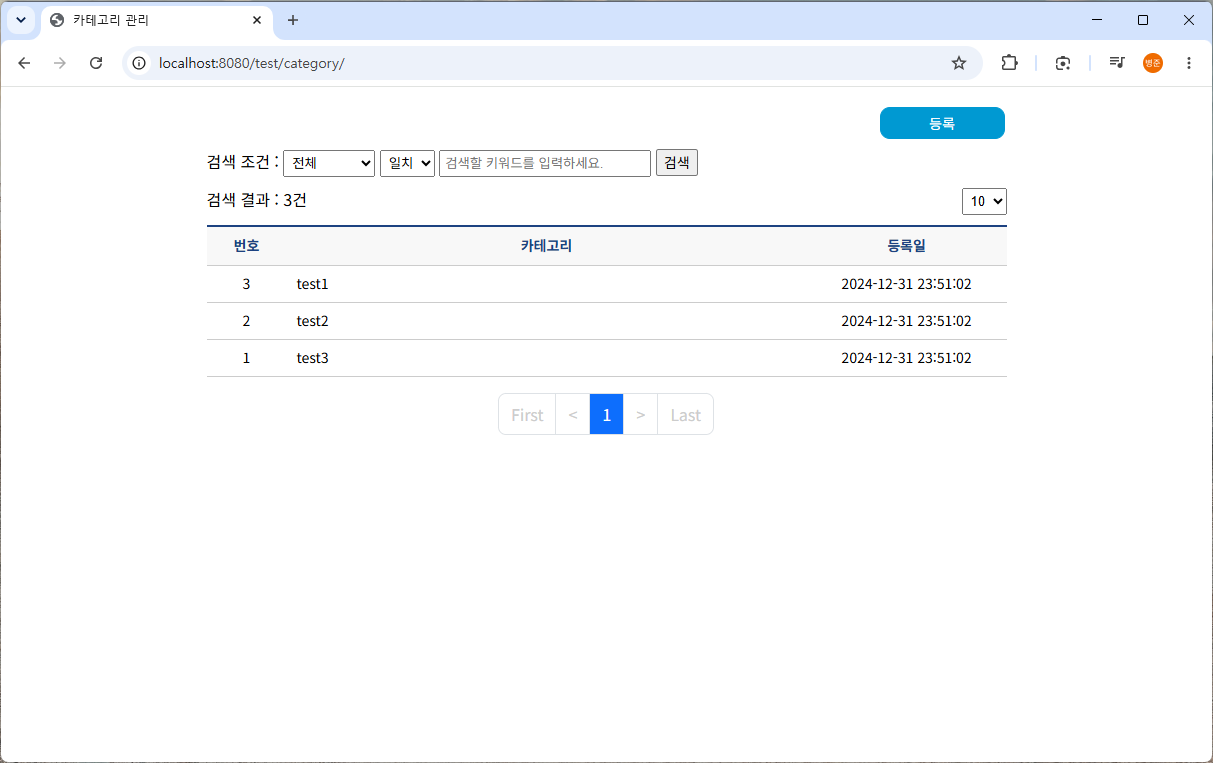
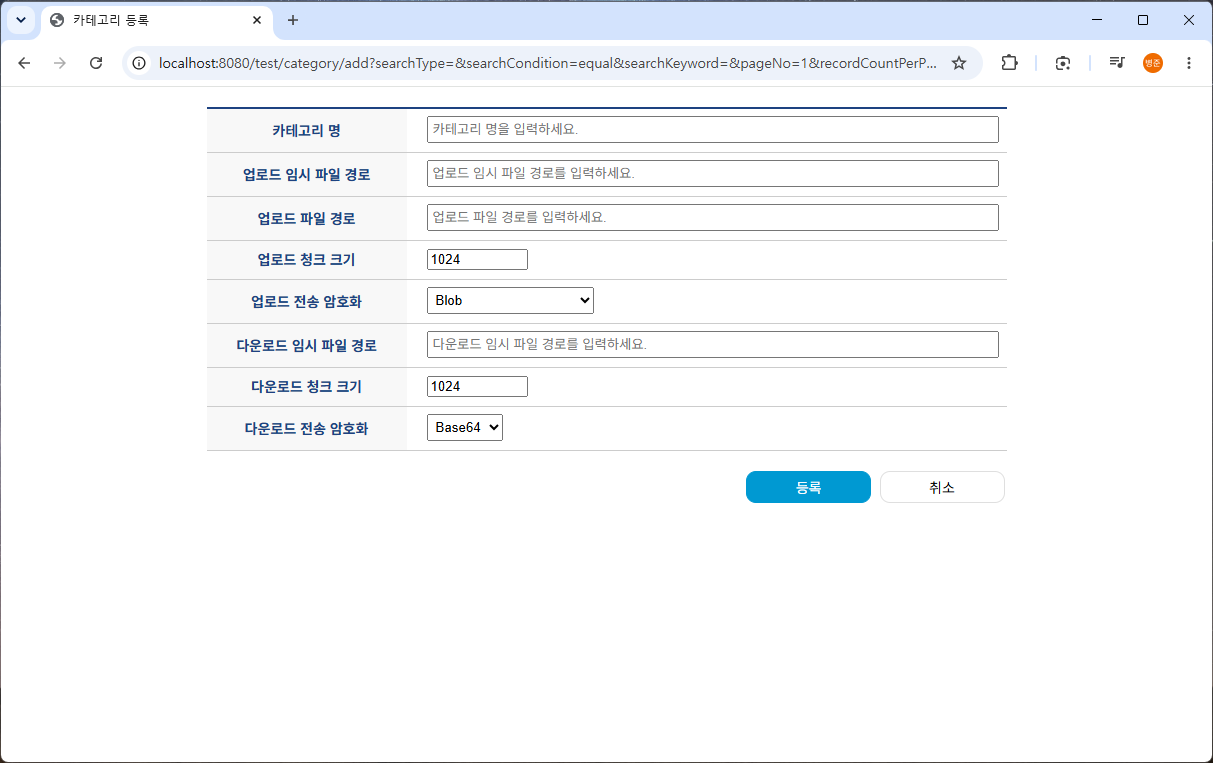
4. transmission\src\main\webapp\WEB-INF\views\test\category\form.jsp를 생성합니다.
<%@ page language="java" contentType="text/html; charset=UTF-8" pageEncoding="UTF-8"%>
<%@ taglib uri="http://java.sun.com/jsp/jstl/core" prefix="c"%>
<%@ taglib uri="http://www.springframework.org/tags/form" prefix="form"%>
<%@ taglib uri="http://www.springframework.org/tags" prefix="spring"%>
<!DOCTYPE html>
<html>
    <head>
        <title>카테고리 등록</title>
        <link rel="stylesheet" type="text/css" href="/css/common.css">
        <script src="https://code.jquery.com/jquery-3.7.1.min.js" integrity="sha256-/JqT3SQfawRcv/BIHPThkBvs0OEvtFFmqPF/lYI/Cxo=" crossorigin="anonymous"></script>
    </head>
    <body>
        <div class="basicLayout">
            <form id="gotoForm" method="POST">
                <input type="hidden" name="searchType" value="${gotoForm.searchType}">
                <input type="hidden" name="searchCondition" value="${gotoForm.searchCondition}">
                <input type="hidden" name="searchKeyword" value="${gotoForm.searchKeyword}">
                <input type="hidden" name="pageNo" value="${gotoForm.pageNo}">
                <input type="hidden" name="recordCountPerPage" value="${gotoForm.recordCountPerPage}">
            </form>
            <form:form modelAttribute="categoryForm" autocomplete="off">
                <form:hidden path="categoryID" />
                <input type="hidden" id="mode" value="${mode}" />
                <table class="editForm">
                    <colgroup>
                        <col style="width:25%">
                        <col style="width:auto">
                    </colgroup>
                    <tbody>
                        <tr>
                            <th scope="row">카테고리 명</th>
                            <td>
                                <form:input path="category" placeholder="카테고리 명을 입력하세요." required="required" class="form-input" />
                                <div class="invalid-feedback">카테고리 명을 입력하세요.</div>
                            </td>
                        </tr>
                        <tr>
                            <th scope="row">업로드 임시 파일 경로</th>
                            <td>
                                <form:input path="upTempFilePath" placeholder="업로드 임시 파일 경로를 입력하세요." required="required" class="form-input" />
                                <div class="invalid-feedback">업로드 임시 파일 경로를 입력하세요.</div>
                            </td>
                        </tr>
                        <tr>
                            <th scope="row">업로드 파일 경로</th>
                            <td>
                                <form:input path="upFilePath" placeholder="업로드 파일 경로를 입력하세요." required="required" class="form-input" />
                                <div class="invalid-feedback">업로드 파일 경로를 입력하세요.</div>
                            </td>
                        </tr>
                        <tr>
                            <th scope="row">업로드 청크 크기</th>
                            <td>
                                <form:input path="upChunkSize" type="number" min="1024" max="1048576" placeholder="업로드 청크 크기를 입력하세요." required="required" class="form-input" />
                                <div class="invalid-feedback">다운로드 청크 크기는 최소 1024(1KB), 최대 1048576(1MB)이내로 입력하세요.</div>
                            </td>
                        </tr>
                        <tr>
                            <th scope="row">업로드 전송 암호화</th>
                            <td>
                                <form:select path="upUseCrypto" required="required">
                                    <form:option value="0" label="Blob" />
                                    <form:option value="1" label="Blob + 검증 + 압축" />
                                    <form:option value="2" label="Blob + 암호화 + 검증" />
                                </form:select>
                                <div class="invalid-feedback">업로드 전송 암호화는 0:Blob 전송, 1:Blob + 검증 + 압축 전송, 2:Blob + 암호화 + 검증 전송만 지원합니다.</div>
                            </td>
                        </tr>
                        <tr>
                            <th scope="row">다운로드 임시 파일 경로</th>
                            <td>
                                <form:input path="downTempFilePath" placeholder="다운로드 임시 파일 경로를 입력하세요." required="required" class="form-input" />
                                <div class="invalid-feedback">다운로드 임시 파일 경로를 입력하세요.</div>
                            </td>
                        </tr>
                        <tr>
                            <th scope="row">다운로드 청크 크기</th>
                            <td>
                                <form:input path="downChunkSize" type="number" min="1024" max="1048576" placeholder="다운로드 청크 크기를 입력하세요." required="required" class="form-input" />
                                <div class="invalid-feedback">다운로드 청크 크기는 최소 1024(1KB), 최대 1048576(1MB)이내로 입력하세요.</div>
                            </td>
                        </tr>
                        <tr>
                            <th scope="row">다운로드 전송 암호화</th>
                            <td>
                                <form:select path="downUseCrypto" required="required" class="form-input">
                                    <form:option value="0" label="Base64" />
                                </form:select>
                                <div class="invalid-feedback">다운로드 전송 암호화는 0:Base64 전송만 지원합니다.</div>
                            </td>
                        </tr>
                    </tbody>
                </table>
            </form:form>
            <div class="buttons">
                <div class="right">
                    <button id="saveBtn" class="button blue">
                        <c:choose>
                            <c:when test="${mode == 'add'}">등록</c:when>
                            <c:when test="${mode == 'edit'}">수정</c:when>
                        </c:choose>
                    </button>
                    <button id="cancelBtn" class="button">취소</button>
                </div>
            </div>
		</div>
		<script src="/scripts/test/category/form.js"></script>
		<spring:hasBindErrors name="categoryForm">
        	<script type="text/javascript">
        		$('#categoryForm').addClass('was-validated');
        		$(function($, window) {
        			<c:forEach var="error" items="${errors.fieldErrors}">
        				setTimeout(function() {
        					$('#${error.field}').addClass("is-invalid");
        					$('#${error.field}').on("change", function(event) {
        						if ($(this).hasClass("is-invalid") && $(event.target).is(':valid')) {
        							$(this).removeClass("is-invalid");
        						}
        					});
        				}, 0);
        			</c:forEach>
        		});
        	</script>
        </spring:hasBindErrors>
    </body>
</html>
5. transmission\src\main\webapp\scripts\test\category\form.js를 생성합니다.
$(function() {
	$('#saveBtn').click(function() {
	    var mode = $('#mode').val();
        var modeText = "등록";
        var modeUrl = "/test/category/add";
        if (mode == "edit") {
            modeText = "수정";
            modeUrl = "/test/category/edit";
        }
        var result = confirm(modeText + "하시겠습니까?");
        if (result) {
            var categoryForm = $('#categoryForm');
            //if (!categoryForm[0].checkValidity()) {
            //    categoryForm.addClass("was-validated");
            //} else {
                categoryForm.attr("action", modeUrl);
                categoryForm.submit();
            //}
        }
	});
	$('#cancelBtn').click(function() {
	    var mode = $('#mode').val();
	    if (mode == "edit") {
	        const categoryID = $('#categoryForm input:hidden[name="categoryID"]').val();
            $(location).attr("href", "/test/category/view?categoryID=" + categoryID + "&" + getGotoParam());
	    } else {
        	$(location).attr("href", "/test/category/?" + getGotoParam());
	    }
	});
	function getGotoParam() {
        const gotoForm = $('#gotoForm');
        const searchType = gotoForm.find('input:hidden[name="searchType"]').val();
        const searchCondition = gotoForm.find('input:hidden[name="searchCondition"]').val();
        const searchKeyword = gotoForm.find('input:hidden[name="searchKeyword"]').val();
        const pageNo = gotoForm.find('input:hidden[name="pageNo"]').val();
        const recordCountPerPage = gotoForm.find('input:hidden[name="recordCountPerPage"]').val();
        return "searchType=" + searchType + "&searchCondition=" + searchCondition + "&searchKeyword=" + encodeURI(searchKeyword) + "&pageNo=" + pageNo + "&recordCountPerPage=" + recordCountPerPage;
    }
});
등록 뷰
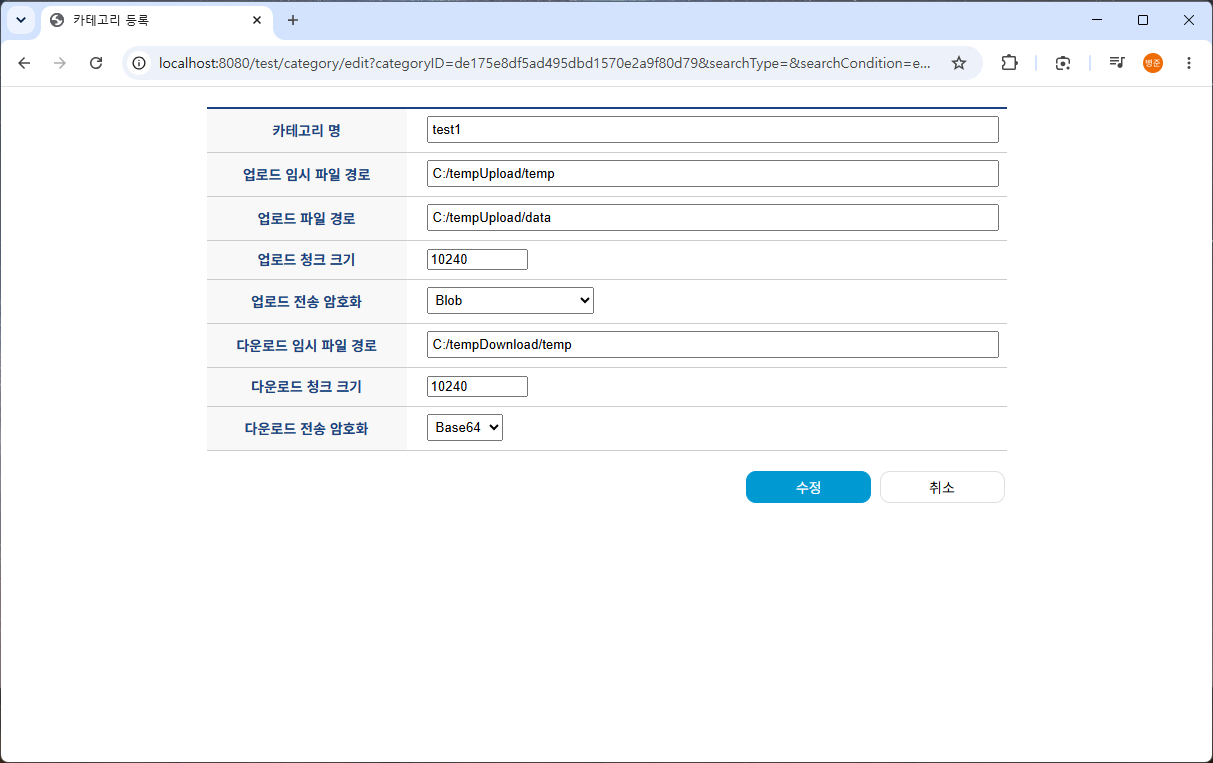
수정 뷰
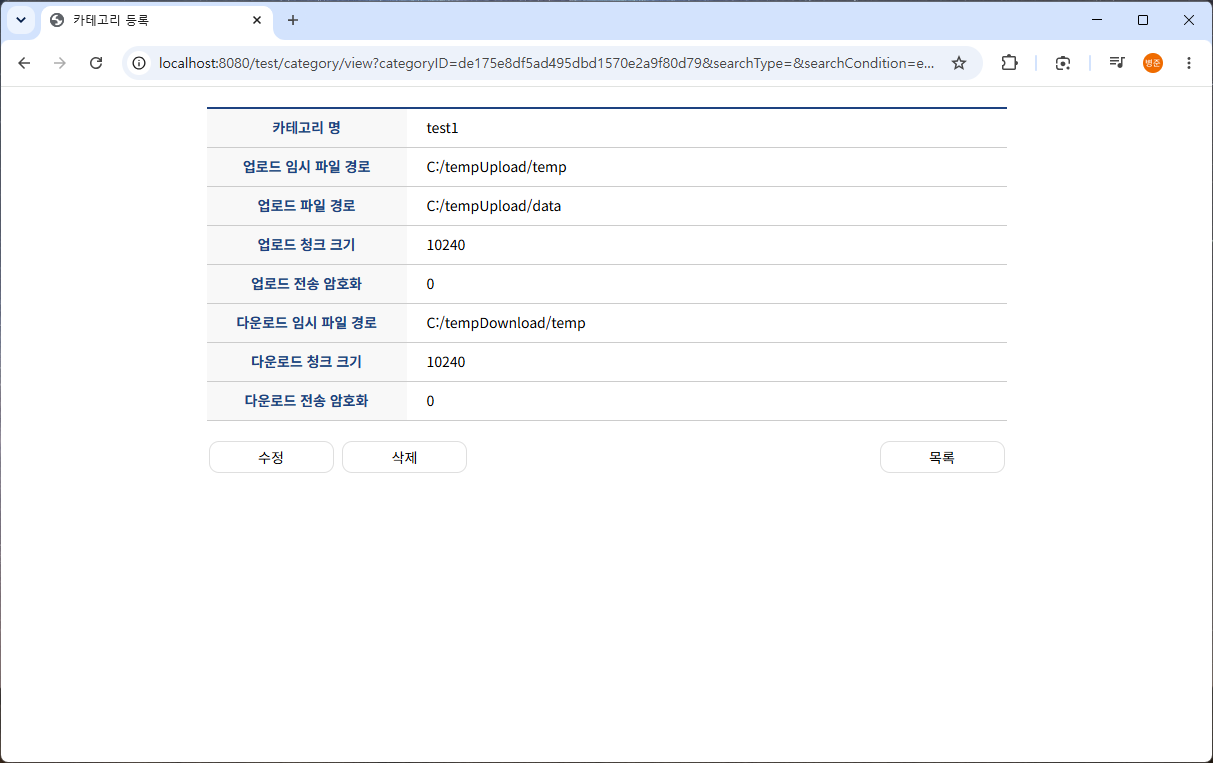
6. transmission\src\main\webapp\WEB-INF\views\test\category\view.jsp를 생성합니다.
<%@ page language="java" contentType="text/html; charset=UTF-8" pageEncoding="UTF-8"%>
<%@ taglib uri="http://java.sun.com/jsp/jstl/core" prefix="c"%>
<%@ taglib uri="http://www.springframework.org/tags/form" prefix="form"%>
<%@ taglib uri="http://www.springframework.org/tags" prefix="spring"%>
<!DOCTYPE html>
<html>
    <head>
        <title>카테고리 등록</title>
        <link rel="stylesheet" type="text/css" href="/css/common.css">
        <script src="https://code.jquery.com/jquery-3.7.1.min.js" integrity="sha256-/JqT3SQfawRcv/BIHPThkBvs0OEvtFFmqPF/lYI/Cxo=" crossorigin="anonymous"></script>
    </head>
    <body>
        <div class="basicLayout">
            <form id="gotoForm" method="POST">
                <input type="hidden" name="searchType" value="${gotoForm.searchType}">
                <input type="hidden" name="searchCondition" value="${gotoForm.searchCondition}">
                <input type="hidden" name="searchKeyword" value="${gotoForm.searchKeyword}">
                <input type="hidden" name="pageNo" value="${gotoForm.pageNo}">
                <input type="hidden" name="recordCountPerPage" value="${gotoForm.recordCountPerPage}">
            </form>
            <form id="categoryView" method="POST">
                <input type="hidden" name="categoryID" value="${categoryItem.categoryID}" />
                <input type="hidden" name="searchType" value="${gotoForm.searchType}">
                <input type="hidden" name="searchCondition" value="${gotoForm.searchCondition}">
                <input type="hidden" name="searchKeyword" value="${gotoForm.searchKeyword}">
                <input type="hidden" name="pageNo" value="${gotoForm.pageNo}">
                <input type="hidden" name="recordCountPerPage" value="${gotoForm.recordCountPerPage}">
            </form>
            <table class="editForm">
                <colgroup>
                    <col style="width:25%">
                    <col style="width:auto">
                </colgroup>
                <tbody>
                    <tr>
                        <th scope="row">카테고리 명</th>
                        <td>${categoryItem.category}</td>
                    </tr>
                    <tr>
                        <th scope="row">업로드 임시 파일 경로</th>
                        <td>${categoryItem.upTempFilePath}</td>
                    </tr>
                    <tr>
                        <th scope="row">업로드 파일 경로</th>
                        <td>${categoryItem.upFilePath}</td>
                    </tr>
                    <tr>
                        <th scope="row">업로드 청크 크기</th>
                        <td>${categoryItem.upChunkSize}</td>
                    </tr>
                    <tr>
                        <th scope="row">업로드 전송 암호화</th>
                        <td>${categoryItem.upUseCrypto}</td>
                    </tr>
                    <tr>
                        <th scope="row">다운로드 임시 파일 경로</th>
                        <td>${categoryItem.downTempFilePath}</td>
                    </tr>
                    <tr>
                        <th scope="row">다운로드 청크 크기</th>
                        <td>${categoryItem.downChunkSize}</td>
                    </tr>
                    <tr>
                        <th scope="row">다운로드 전송 암호화</th>
                        <td>${categoryItem.downUseCrypto}</td>
                    </tr>
                </tbody>
            </table>
            <div class="buttons">
                <div class="left">
                    <button id="editBtn" class="button">수정</button>
                    <button id="deleteBtn" class="button">삭제</button>
                </div>
                <div class="right">
                    <button id="listBtn" class="button">목록</button>
                </div>
            </div>
		</div>
		<script src="/scripts/test/category/view.js"></script>
    </body>
</html>
7. transmission\src\main\webapp\scripts\test\category\view.js를 생성합니다.
$(function() {
    $('#editBtn').click(function() {
        var result = confirm("수정하시겠습니까?");
        if (result) {
            var categoryView = $('#categoryView');
            categoryView.attr("method", "get");
            categoryView.attr("action", "/test/category/edit");
            categoryView.submit();
        }
    });
    $('#deleteBtn').click(function() {
        var result = confirm("삭제하시겠습니까?");
        if (result) {
            var categoryView = $('#categoryView');
            categoryView.attr("action", "/test/category/remove");
            categoryView.submit();
        }
    });
    $('#listBtn').click(function() {
        $(location).attr("href", "/test/category/?" + getGotoParam());
    });
	function getGotoParam() {
        const gotoForm = $('#gotoForm');
        const searchType = gotoForm.find('input:hidden[name="searchType"]').val();
        const searchCondition = gotoForm.find('input:hidden[name="searchCondition"]').val();
        const searchKeyword = gotoForm.find('input:hidden[name="searchKeyword"]').val();
        const pageNo = gotoForm.find('input:hidden[name="pageNo"]').val();
        const recordCountPerPage = gotoForm.find('input:hidden[name="recordCountPerPage"]').val();
        return "searchType=" + searchType + "&searchCondition=" + searchCondition + "&searchKeyword=" + encodeURI(searchKeyword) + "&pageNo=" + pageNo + "&recordCountPerPage=" + recordCountPerPage;
    }
});
보기 뷰
'Spring > 대용량 파일 전송' 카테고리의 다른 글
| [6] 대용량 파일 전송 시스템 개발 - 암호화 전송, RSA + AES (0) | 2026.08.23 |
|---|---|
| [5] 대용량 파일 전송 시스템 개발 - 압축 / 무결성 검증, gzip, pako, MessageDigest (0) | 2026.08.21 |
| [4] 대용량 파일 전송 시스템 개발 - 대용량 파일 업로드, Blob (0) | 2026.08.20 |
| [2] 대용량 파일 전송 시스템 개발 - 개발 환경, 공통 부분 소스 (0) | 2026.08.19 |
| [1] 대용량 파일 전송 시스템 개발 - 대용량 파일 업로드 문제점과 해결방법 (0) | 2026.08.18 |